
Mr. Macintosh on Twitter highlighted this cool set of dynamic wallpapers based on graphics from Apple’s developer website.
Category: Apple
Fix Mission Control and App Switcher Crashes in macOS Monterey
Over the last few weeks, I’ve had a few instances of weird behavior my Mac:
- Gestures to move between Spaces are ignored
- The Command+Tab interface won’t show when invoked
- Mission Control gestures are ignored
Thankfully, the fix is easy enough. There’s no need to restart to bring these features back. In Terminal, the killall Dock command will restart the Dock process, which is apparently in charge of all of these features.
Sara Dietschy Meets Daisy⇢
If you’re going to recycle an iPhone, why not do it with some style?
Bloomberg: M2 Macs in Testing⇢
None of this should really be a surprise, but the most interesting machine in Gurman’s article, to me at least, is the Mac mini, which he says is in testing:
A Mac mini with an M2 chip, codenamed J473. This machine will have the same specifications as the MacBook Air. There’s also an “M2 Pro” variation, codenamed J474, in testing.
Apple is also testing a Mac mini with an M1 Pro chip, the same processor used in the entry-level 14-inch and 16-inch MacBook Pros today. That machine is codenamed J374. The company has tested an M1 Max version of the Mac mini as well, but the new Mac Studio may make these machines redundant.
Predicting Supported Models for macOS 13⇢
With WWDC announced for June 6th, I thought it would make a fun thought exercise and try to speculate what models Apple will plan to drop with macOS 13.
Snell, on Apple’s Baseball Offering⇢
Jason Snell likes baseball. I don’t, and sometimes he teases me about it. That said, his impressions of Apple’s new “Friday Night Baseball” was a really interesting read. I particularly like how he thinks the whole thing could become much more interactive:
Every single viewer is watching on a smart device of some kind. How about letting us customize what stats we see on screen? What about alternate camera views or a natural-sound-only audio stream featuring crowd noise and mic’ed up players? What about alternate broadcasts entirely, with audio from statheads or scouts or umpires or former players talking about a different game aspect? What about something I’m not even thinking of here?
Apple Podcasts Connect Adds ‘Followers’ Metrics⇢
All creators can now view metrics for Followers in Apple Podcasts Connect.
From the Analytics tab, you can view followers per show and measure followers across shows.
After selecting a show, you can quickly view the number of New Followers netted over the last week, month, 60 days, and all time. You can also see Time Listened as a precent of those following and not following the show.
By navigating to the Trends menu, you can view a graph of followers over time and the number of followers gained or lost on a specific day or during a specified range.
WWDC 2022 Announced⇢
Apple has announced this year’s WWDC. The annual event is taking place June 6-10.
Since 2020, WWDC has been fully virtual thanks to COVID. This year, Apple is dipping its toe into the water of having people back in person:
In addition to the online conference, Apple will host a special day for developers and students at Apple Park on June 6 to watch the keynote and State of the Union videos together, along with the online community. Space is limited and details on how to apply to attend will be provided soon.
M1 Pro, M1 Max MacBook Pros Now on Refurb Store⇢
As pointed out by MacRumors, Apple now has the new 14-inch and 16-inch MacBook Pro in its certified refurbished store. Buying refurb can be a great way to save some money when purchasing a new machine. They are warrantied like new, which is great, but stock changes over time, so if you’re in the market and see a notebook you want, don’t wait around too long before ordering.
Apple Business Essentials Program Launched⇢
Apple has launched its Business Essentials Program. It’s a new service for businesses that offers 24/7 Apple support, device management, iCloud space and more for all one monthly fee per user.
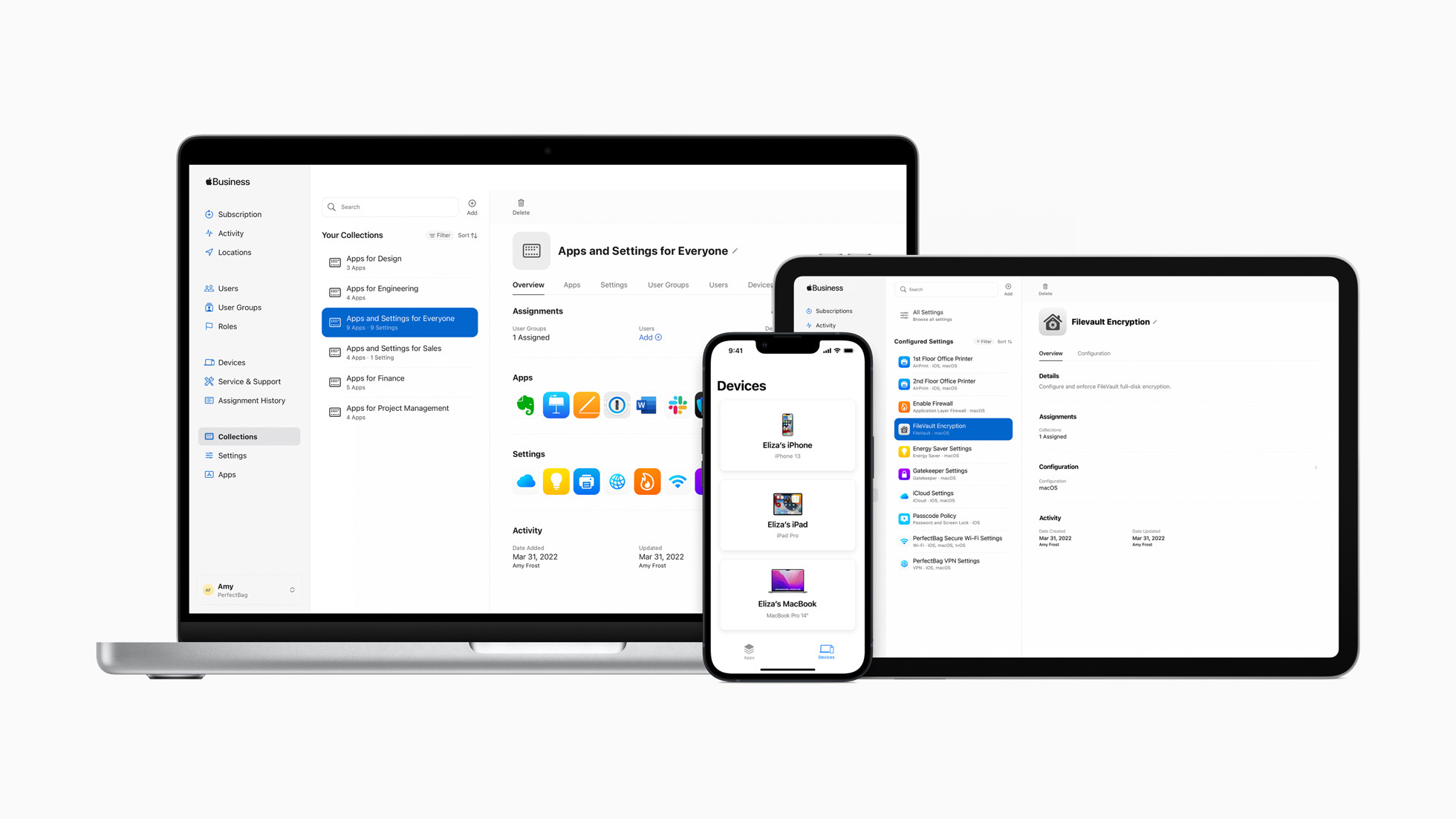
Here’s a bit from the press release:
Apple Business Essentials supports small businesses throughout the entire device management life cycle — from device setup, to device upgrades — while providing strong security, prioritized support, and data storage and backup. The complete solution begins with simple employee onboarding, allowing a small business to easily configure, deploy, and manage Apple products from anywhere. With the Collections feature, groups of apps can be delivered to employees or teams, and settings can be automatically pushed to devices, such as VPN configurations, Wi-Fi passwords, and more.
Apple’s Still Charging More for Black Products Today⇢
Say what you will about the black MacBook, at least it wasn’t as silly as Apple’s pricing for it’s Mac input devices: Magic Mouse:
- White: $79
- Black: $99
Magic Trackpad:
- White: $129
- Black: $149
Magic Keyboard with Touch ID and Numeric Keypad:
- White: $179
- Black: $199
iOS Keyboard Suggests Dog and Cow Emoji When ‘Clarus’ is Typed
Like the headline says, the iOS keyboard emoji suggestions suggests two emoji as replacements when you type “Clarus.” The problem is that they are in the wrong order:
 Clarus is a dogcow, not a cowdog. If Apple is going to have this VERY EXCELLENT reference in the keyboard, the details should be right.1
Thanks to Jason Robinson for pointing this terrible bug out.
I’ve filed this as Feedback FB9970338 for Apple to fix.