Air to the Throne

Life is full of trade-offs. I often think about this in terms of vehicles. If you have a big family, a minivan is probably the right call, even if it means sacrificing performance. A luxury sedan may be nice to sit in, but it will cost you big bucks. You can drive a pickup truck, but you will probably pay for it at the pump.

In the world of technology, trade-offs change nature over time. The first iPhone was amazing, but it was expensive and only ran on AT&T. The original MacBook Air was an incredible piece of engineering, but it ran hot and slow.
Continue reading ⇢

Review: The MacBook Pro

This week marks the 20th anniversary of the original MacBook Pro. In the spirit of this article, I’m going to review it as if I were blogging about Macs back in 2006. Just go with me here.


My Laptop History

I have been a PowerBook G4 user since 2002, when my boss handed me a 1 GHz Titanium PowerBook to use for page layout, audio editing, and other media tasks at the non-profit where I spent time after school and on weekends.

Continue reading ⇢

The Logitech MX Master

I recently upgraded my mouse to the new Logitech MX Master 4 and have been really happy with it.

For years, I used the old Logitech Performance MX, long after it was discontinued. After my last backup copy of it died, I moved to the Logitech MX Master 3S. It was great, and the 4 builds atop it with some nice new features. After a few days, here are some thoughts:

  • Using a Logitech mouse over Bluetooth, without a dongle, is pretty great. It’s nice to get a USB port back.
  • The 4 weighs less weighs more than the 3S, but it feels even easier so slide around.
  • The new materials are fine. Previous Logitech mice had a tendency to get a little sticky over time, and if the new plastic holds up better over time, I’m fine with it feeling a little less nice.
  • I pretty quickly turned the haptic feedback off.

In the past, the Logi Options software came with lot of stuff I didn’t want to use (including some poorly-implemented AI features), but it’s easier to turn things off now. I used it to set my mouse’s buttons up this way:

Continue reading ⇢

iPhone Heir to the Throne

Picking an iPhone used to be easy.

For years, the only real option was what color you wanted, at least for some models. Then came the iPhone 6 and superior-yet-a-little-bendy 6 Plus, which made things a little more complicated.

A few years later, things started getting weird. In rapid succession, we saw the 8 and X, then the XR and XS and XS Max, then the 11, 11 Pro, and 11 Pro Max.

Starting with the iPhone 12, Apple introduced four new iPhones each year: two regular iPhones and two Pro iPhones. The iPhone mini came and went, with the Plus replacing it.

Continue reading ⇢

Apple Vision Pro Review: It’s a Carousel

Sometimes I feel like I was born in the wrong era; coming along in 1986 meant that I missed a lot of the early days of personal computing. Sure, my dad had a Windows 3.1.1 notebook built by NEC, and yeah, we ended up with a Windows 95 tower from Packard Bell a few years later, but the closest I got to an Apple II as a kid was seeing a few stacked up in the corner of my elementary school library.

Continue reading ⇢

Review: The iPhone 15 Pro Max’s Greatness is Thicker than Titanium

Obviously the iPhone 4 is in the iPhone Update Hall of Fame. Its Retina display was game-changing, and now we enjoy pixel density that once seemed like science fiction.

The iPhone 6 and 6 Plus, despite their rather lackluster design, are also in the Hall of Fame. They were the first big iPhones, and took Apple’s sales numbers into the stratosphere.

Then there’s the iPhone X, which totally redefined the iOS experience while ditching the home button and embracing a full-screen design with Face ID.

Continue reading ⇢

A War of Head Versus Heart: The M2 MacBook Air

I’m a big fan of Death Cab for Cutie. Like most music that has stuck with me, I first came across the band’s work in high school. My buddy Levi drove a first-generation Miata, and one night as we drove around the suburb outside of Memphis that we called home, he popped in a burned CD labeled “DCFC.”

“I think you’re going to like these guys,” he said, turning up the volume. As a somewhat-emo 17 year old, I was hooked.

Continue reading ⇢

Mac Pro Exit Review

Five years ago this week, we got news that the Mac Pro wasn’t dead, and more importantly, that Apple knew that it had lost the plot when it came to the Mac.

In the years since Apple has shipped both the iMac Pro and a new Mac Pro, but also a Retina MacBook Air and (eventually) notebooks with non-busted keyboards. The Mac mini was overhauled to be much more powerful. macOS got a new, fresh design and some amazing new features.

Continue reading ⇢

Overcast 2022.2 Delivers Phase One of App’s Redesign 

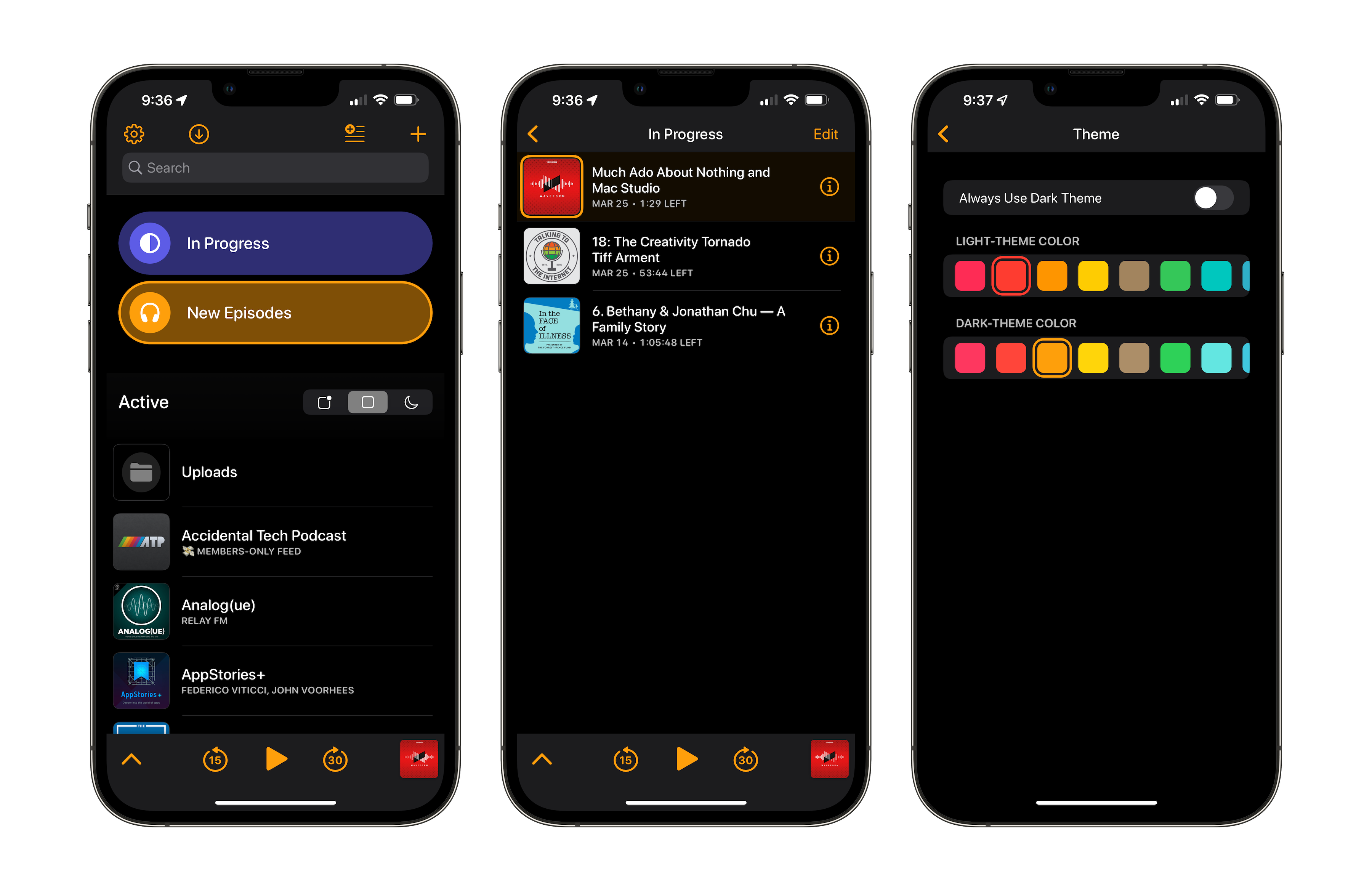
Marco Arment’s excellent podcast client Overcast has been updated today to version 2022.2. The new build includes what he is calling “Phase One” of an app-wide redesign.

As you can see from these screenshots, quite a bit is new:

Overcast 2022.2

The biggest improvement comes to the styling of playlists. I’m not a huge playlist user as you can see, but I can appreciate this change. I know some folks have a lot more playlists than I do, and I think the ability to customize the color and icon of each playlist individually really adds a lot of fun to the app.

Continue reading ⇢

MaskerAid 

Relay FM podcaster 1 and all-around nice human Casey Liss has a new app out today. It’s called MaskerAid, and it’s pretty darn clever. Here’s a bit from his announcement blog post:

In short, MaskerAid allows you to quickly and easily add emoji to images. Plus, thanks to the magic of machine learning, MaskerAid will automatically place emoji over any faces it detects.

Like Casey outlines in his post, I have become increasingly uncomfortable with using social media to share photos or details about my children and their lives.

Continue reading ⇢